Playnexma
Drift Module
Drift Module
Couldn't load pickup availability
- 📁 Digital file available after purchase
- 🗓️ Long-term availability
- 🔐 Secure checkout
- 📝 Content updated in 2026
Self-paced learning overview
1. Problem Statement
In many learning game projects, movement first seems like a simple element: a character moves, objects change position, and events happen in a certain order. But when the scene becomes more detailed, questions appear about pace, direction, collisions, limits, and reactions after movement. If these parts are not planned, interaction may feel sharp, random, or unclear for the player. It can also be difficult to understand how movement connects with rules, conditions, and object states. Drift Module is created to help view movement as part of the wider game logic, not only as travel from one point to another.
2. Solution
Drift Module explains movement through route, pace, limits, collisions, and state change. The course helps explore how a character or object moves inside a scene, what affects its path, and how the system responds to position changes. You will learn to describe movement not separately, but together with rules, conditions, and events that come with it. The materials show how small changes in direction, speed, stopping, or drifting can change the feel of interaction. This approach suits learners who want to make a learning prototype more consistent in movement and object behavior.
3. What’s Inside
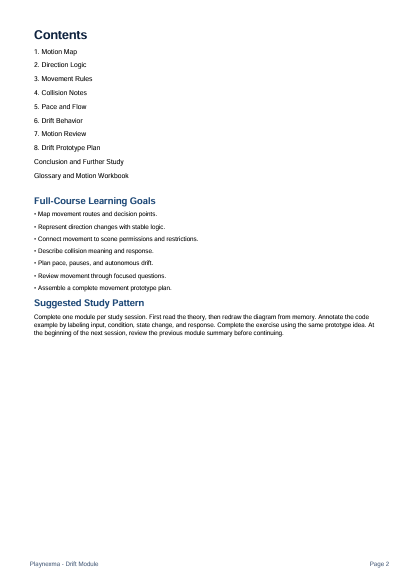
- Module 1: Motion Map — how to create a movement map for a character, objects, or key scene elements.
- Module 2: Direction Logic — how to describe movement direction, route changes, and response to scene boundaries.
- Module 3: Movement Rules — how to connect movement with rules, conditions, events, and states.
- Module 4: Collision Notes — how to plan collisions, zone crossing, stops, and reactions after contact.
- Module 5: Pace and Flow — how movement pace affects the perception of mechanics, scene, and player action.
- Module 6: Drift Behavior — how to create object behavior that changes direction, drifts, or responds to the environment.
- Module 7: Motion Review — how to review movement in a learning prototype and find places where the logic needs more detail.
- Module 8: Drift Prototype Plan — how to prepare a prototype plan with route, limits, reactions, pace, and state changes.
4. Who Is This For?
✅ A good fit if you...
- have already worked with scenes, objects, and base mechanics;
- want to better understand how movement affects game interaction;
- have a learning prototype where routes, collisions, or pace need more structure;
- like analyzing object behavior through diagrams, notes, and practical examples;
- want to connect movement with rules, conditions, states, and events.
❌ Not for you if...
- you are only getting familiar with game development and have not worked with a base scene structure yet;
- you are looking for a short introduction without practical diagrams and tasks;
- you do not want to study movement, routes, collisions, and object behavior;
- you expect a large finished project without your own work with the materials;
- you want to focus only on written notes without scene analysis.
5. What You’ll Learn
- how to create a movement map for a learning game project;
- how to describe a character or object route inside a scene;
- how to connect movement with rules, conditions, and states;
- how to plan collisions, stops, boundaries, and reactions;
- how movement pace affects interaction feel;
- how to find unclear points in object behavior;
- how to prepare a movement diagram for a small prototype;
- how to make movement part of the overall scene logic.
6. Learning Markers
After completing Drift Module, you should have a movement map for one learning prototype with routes, collision zones, limits, and reactions. You will be able to explain how a character or object changes position, what affects direction, and which events appear after movement. You will also prepare notes for reviewing pace, object behavior, and scene logic. The result depends on careful work with modules, examples, diagrams, and your own practical tasks.
7. Terms and Support
Drift Module includes paid learning materials, so it is worth reviewing the tier description, module list, and learning goals before checkout. If technical questions appear after purchase while receiving the materials or using the course page, you can contact the Playnexma team within 30 days. We will review the request according to the store terms and help with the next steps. All requests are handled within the service rules, course description, and learning materials.
8. Certificates
After finishing Drift Module, the learner may receive a certificate reflecting completion of materials about movement, routes, pace, collisions, and object behavior.
Are Playnexma courses suitable for beginners?
Are Playnexma courses suitable for beginners?
Yes, some courses are created for learners who are just getting familiar with game development. Each tier includes a level description so you can choose materials that match your current experience.
What is included in the learning materials?
What is included in the learning materials?
Depending on the tier, the materials may include modules, practical tasks, examples of game project structure, mechanics explanations, working notes, and additional learning resources.
Can I study at my own pace?
Can I study at my own pace?
Yes, the materials are prepared so you can move through them in your own rhythm. You can return to topics, review examples, and repeat practical tasks.
Share